Open IBM Cognos Connection:
Start your Web browser.
In the address bar, type the URL supplied by your administrator, and then press Enter. The URL looks something like this:
http://servername/cognos8
In the IBM Cognos 8 Welcome page, click IBM Cognos content.
Click the new page button  .
.
Type the name My Great Outdoors page, click Select My Folders as the location for the new page, and click Next.
Specify the page layout:
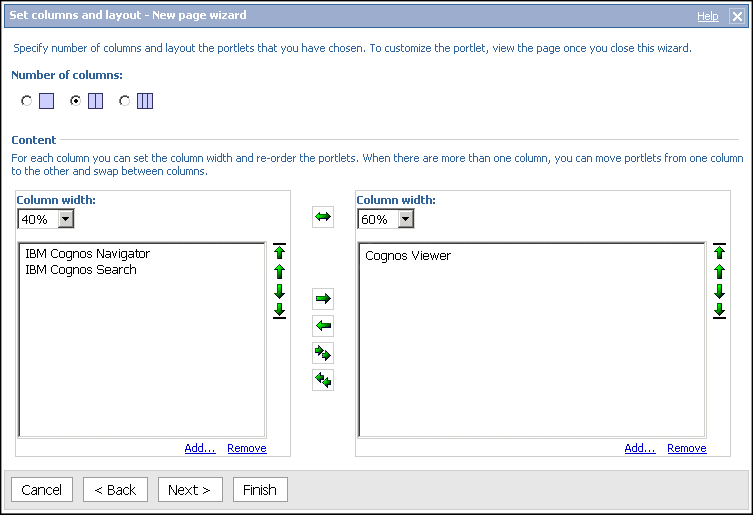
Under Number of columns, select 2 columns.
Change the width of the left column to 40% and the right column to 60%.
Add content to your page:
Under the left column, click Add.
Click IBM Cognos Content.
Select the IBM Cognos Navigator, IBM Cognos Search, and Cognos Viewer portlets, and click the arrow to move them to the Selected entries box.
Tip: You can preview the content of the portlets by clicking the view this portlet button
 in the Actions column.
Click OK.
In the left column, click Cognos Viewer and click the move one item right arrow
 .
. 
Click Next.
Define the appearance of the page:
In the Title box, type My Great Outdoors page.
Tip: You can change the formatting of the text.
Click Next.
Select the Add this page to the portal tabs check box.
Click Finish.
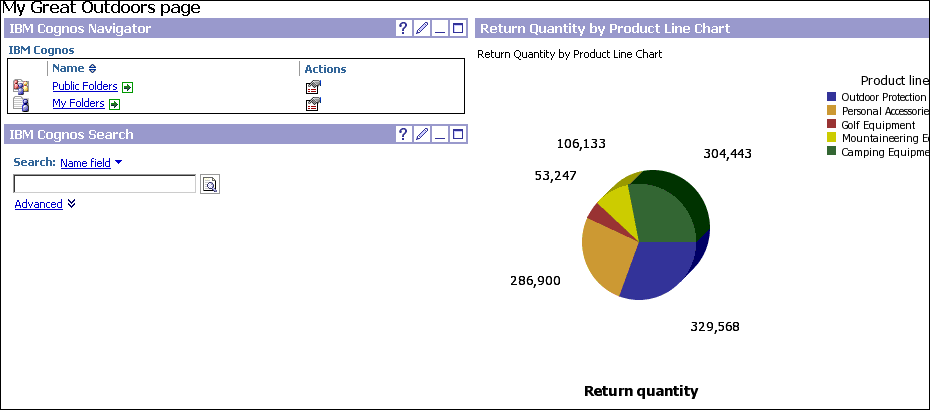
The My Great Outdoors page that you created appears as a tab in IBM Cognos Connection.
Enhance the content of your page:
Click the My Great Outdoors page tab.
In the Cognos Viewer portlet, click the edit button
 .
.Under Entry, click Select an entry, and select the Return Quantity by Product Line Chart sample report.
Tip: You can find this report in Public Folders > GO Data Warehouse (analysis) > Query Studio Report Samples. You can also use any other sample report.
Under Portlet height in pixels, type 600.
Click OK.
The report now appears in the right column of your portal page.
If the report was not previously run and saved, click the run button
 in
the Cognos Viewer portlet. In the Run
with options page, click Save the report and
then click Run.
in
the Cognos Viewer portlet. In the Run
with options page, click Save the report and
then click Run.
 , click the down arrow, and click Set
View as Home.
, click the down arrow, and click Set
View as Home. , on the left side of the tab bar, click Remove
this tab.
, on the left side of the tab bar, click Remove
this tab.